
Table of Contents
- QTextTableFormat
- Synopsis
- Detailed Description
PySide2.QtGui.QTextTableFormatPySide2.QtGui.QTextTableFormat.alignment()PySide2.QtGui.QTextTableFormat.borderCollapse()PySide2.QtGui.QTextTableFormat.cellPadding()PySide2.QtGui.QTextTableFormat.cellSpacing()PySide2.QtGui.QTextTableFormat.clearColumnWidthConstraints()PySide2.QtGui.QTextTableFormat.columnWidthConstraints()PySide2.QtGui.QTextTableFormat.columns()PySide2.QtGui.QTextTableFormat.headerRowCount()PySide2.QtGui.QTextTableFormat.setAlignment()PySide2.QtGui.QTextTableFormat.setBorderCollapse()PySide2.QtGui.QTextTableFormat.setCellPadding()PySide2.QtGui.QTextTableFormat.setCellSpacing()PySide2.QtGui.QTextTableFormat.setColumnWidthConstraints()PySide2.QtGui.QTextTableFormat.setColumns()PySide2.QtGui.QTextTableFormat.setHeaderRowCount()
Previous topic
Next topic
QTextTableFormat露
The
QTextTableFormatclass provides formatting information for tables in aQTextDocument. More鈥�

Synopsis露
Functions露
def
alignment()def
borderCollapse()def
cellPadding()def
cellSpacing()def
clearColumnWidthConstraints()def
columnWidthConstraints()def
columns()def
headerRowCount()def
setAlignment(alignment)def
setBorderCollapse(borderCollapse)def
setCellPadding(padding)def
setCellSpacing(spacing)def
setColumnWidthConstraints(constraints)def
setColumns(columns)def
setHeaderRowCount(count)
Detailed Description露
A table is a group of cells ordered into rows and columns. Each table contains at least one row and one column. Each cell contains a block. Tables in rich text documents are formatted using the properties defined in this class.
Tables are horizontally justified within their parent frame according to the table鈥檚 alignment. This can be read with the
alignment()function and set withsetAlignment().Cells within the table are separated by cell spacing. The number of pixels between cells is set with
setCellSpacing()and read withcellSpacing(). The contents of each cell is surrounded by cell padding. The number of pixels between each cell edge and its contents is set withsetCellPadding()and read withcellPadding().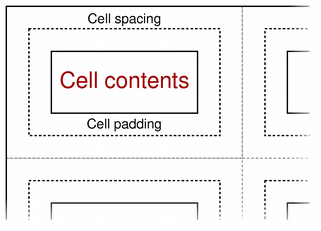
The table鈥檚 background color can be read with the
background()function, and can be specified withsetBackground(). The background color of each cell can be set independently, and will control the color of the cell within the padded area.The table format also provides a way to constrain the widths of the columns in the table. Columns can be assigned a fixed width, a variable width, or a percentage of the available width (see
QTextLength). Thecolumns()function returns the number of columns with constraints, and thecolumnWidthConstraints()function returns the constraints defined for the table. These quantities can also be set by callingsetColumnWidthConstraints()with a vector containing new constraints. If no constraints are required,clearColumnWidthConstraints()can be used to remove them.See also
- class PySide2.QtGui.QTextTableFormat露
PySide2.QtGui.QTextTableFormat(fmt)
PySide2.QtGui.QTextTableFormat(QTextTableFormat)
- param fmt:
- param QTextTableFormat:
Constructs a new table format object.
- PySide2.QtGui.QTextTableFormat.alignment()露
- Return type:
Alignment
Returns the table鈥檚 alignment.
See also
- PySide2.QtGui.QTextTableFormat.borderCollapse()露
- Return type:
bool
Returns true if is enabled.
See also
- PySide2.QtGui.QTextTableFormat.cellPadding()露
- Return type:
float
Returns the table鈥檚 cell padding. This describes the distance between the border of a cell and its contents.
See also
- PySide2.QtGui.QTextTableFormat.cellSpacing()露
- Return type:
float
Returns the table鈥檚 cell spacing. This describes the distance between adjacent cells.
See also
- PySide2.QtGui.QTextTableFormat.clearColumnWidthConstraints()露
Clears the column width constraints for the table.
- PySide2.QtGui.QTextTableFormat.columnWidthConstraints()露
- Return type:
Returns a list of constraints used by this table format to control the appearance of columns in a table.
See also
- PySide2.QtGui.QTextTableFormat.columns()露
- Return type:
int
Returns the number of columns specified by the table format.
- PySide2.QtGui.QTextTableFormat.headerRowCount()露
- Return type:
int
Returns the number of rows in the table that define the header.
See also
- PySide2.QtGui.QTextTableFormat.setAlignment(alignment)露
- Parameters:
alignment 鈥�
Alignment
Sets the table鈥檚
alignment.See also
- PySide2.QtGui.QTextTableFormat.setBorderCollapse(borderCollapse)露
- Parameters:
borderCollapse 鈥� bool
Enabling
borderCollapsewill have the following implications:With
borderCollapsedisabled, cell borders can still be styled usingQTextTableCellFormatbut styling will be applied only within the cell鈥檚 frame, which is probably not very useful in practice.
- PySide2.QtGui.QTextTableFormat.setCellPadding(padding)露
- Parameters:
padding 鈥� float
Sets the cell
paddingfor the table. This determines the distance between the border of a cell and its contents.See also
- PySide2.QtGui.QTextTableFormat.setCellSpacing(spacing)露
- Parameters:
spacing 鈥� float
Sets the cell
spacingfor the table. This determines the distance between adjacent cells.This property will be ignored if
borderCollapseis enabled.See also
- PySide2.QtGui.QTextTableFormat.setColumnWidthConstraints(constraints)露
- Parameters:
constraints 鈥�
Sets the column width
constraintsfor the table.
- PySide2.QtGui.QTextTableFormat.setHeaderRowCount(count)露
- Parameters:
count 鈥� int
Declares the first
countrows of the table as table header. The table header rows get repeated when a table is broken across a page boundary.See also
漏 2022 The Qt Company Ltd. Documentation contributions included herein are the copyrights of their respective owners. The documentation provided herein is licensed under the terms of the GNU Free Documentation License version 1.3 as published by the Free Software Foundation. Qt and respective logos are trademarks of The Qt Company Ltd. in Finland and/or other countries worldwide. All other trademarks are property of their respective owners.